
(formerly PhoneBridge)
Your Android phone and your Mac, finally on speaking terms.
Calls, messages and notifications on your Mac. Codes copied for you. One clipboard across both. Free, open source, encrypted, and it never touches the internet.
Free · MIT · macOS 14+ · Android 13+ · same Wi-Fi
Reply from your Mac.
Hover a WhatsApp, SMS or Telegram alert, type, send. The phone answers through the app’s own reply action, so it lands in the chat like any other message.
Demo with a fictional contact.
Codes, already copied.
When a verification code arrives by SMS it’s on your Mac clipboard in about 20 ms in our tests. Press ⌘V.
Demo bank and code. It reads the SMS itself, because Android 15 and later hide codes from notification listeners.
One clipboard.
Copy text, a link or an image on either device and paste on the other. HDR phone photos paste in true colour. Passwords from password managers are never sent.
Or use Share → Send to Mac from any app, or the Quick Settings tile to send what you just copied.
The phone side, for real.
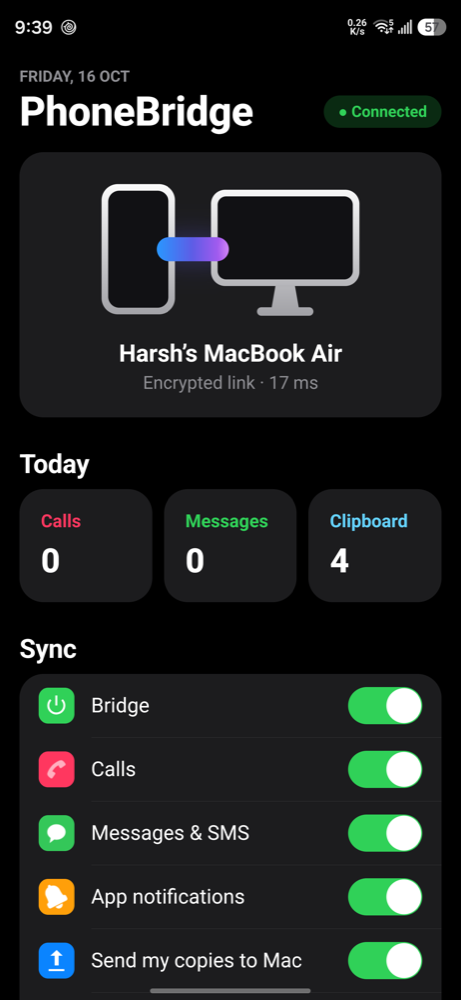
This is the Kitbridge app on a Samsung Galaxy S26 Ultra: connected to a MacBook Air over an encrypted link at 17 ms, with today’s counts and a switch for every kind of sync.
- Turn calls, messages, other apps, sending copies and receiving copies on or off.
- Tap Calls, Messages or Clipboard to see the last 20, copy a clip again, or delete.
- The history stays on the phone.
Like an iPhone and a Mac.
Everything you’d expect, none of it routed through someone’s server.
Messages and app notifications
SMS, WhatsApp, Telegram and every other app your phone notifies from, as native Mac alerts with the sender’s photo and the app’s badge. Clear one and it stays cleared.
Calls on your Mac
Incoming calls appear as Mac alerts, showing the caller the way your phone does.
Reply from the alert
WhatsApp, SMS and Telegram, sent through the app’s own reply action.
OTP auto-copy
Handles bank SMS, Google and “123 456” codes, and ignores amounts like “₹1500”.
One clipboard
Text, links and images, both ways. Passwords from password managers never leave their device.
Send to Mac
Share any photo or text to Send to Mac, or tap the Quick Settings tile.
History
The last 20 calls, messages and clips live on your phone. Copy one again or delete it.
Locked, and still on
The link stays up while the phone is locked and re-sends anything you missed after a drop.
You’re in control
A switch for calls, messages, other apps, sending copies and receiving copies.
How it stays private.
Your phone talks to your Mac. Nobody else is in the conversation.
What protects you
- No server, no account, no telemetry. It works only on the same Wi-Fi.
- A fresh
X25519key exchange on every connection, authenticated by a 256-bit pairing key made on your Mac. - Messages sealed with
AES-256-GCMand strict counters, so they can’t be read, altered or replayed. - Forward secrecy: if the pairing key leaks later, old sessions stay sealed.
- Pairing is locked to
adb, so other apps on your phone can’t re-pair it. - Independent security review, and a test suite that records every byte on the wire and checks that no message text or code appears in it.
What it doesn’t protect against
- Someone with your unlocked Mac or phone.
- What adb can do: anyone you pair with adb can control the phone. Turn Wireless debugging off after setup if you don’t use it.
- The broad READ_LOGS permission. It’s only used to watch for clipboard changes, but you can revoke it.
- People on your Wi-Fi can see that a connection exists, and when and how much data flows, but not the contents.
The full design is in SECURITY.md and the privacy policy is here.
The optional copy detector, honestly
Android blocks background clipboard reads, so Kitbridge offers an Accessibility service you switch on yourself (Settings → Accessibility → Installed apps → Kitbridge: copy to Mac). It’s off until you do. Android passes it the label of what you tap and the text of pop-ups and notifications. Kitbridge checks only for Copy/Copied and never stores, logs or sends that text. Only the item you copied goes to your Mac. Without it, a log-watching fallback is used, and Share → Send to Mac always works.
How it works.
Install on your Mac
One line in Terminal installs the menu bar app, which starts at login and relaunches after a crash.
Pair the phone once
Over Wi-Fi with Wireless debugging and a pairing code. That’s the only time you touch setup.
Forget it’s there
Both sides reconnect on their own whenever they share a network.
One line on your Mac.
On the phone, open Settings → Developer options → Wireless debugging → Pair device with pairing code, then type the code into the installer when it asks.
curl -fsSL https://raw.githubusercontent.com/harshkit/kitbridge/main/install.sh | bash
Requirements.
You need
- A Mac on macOS 14 or later
- An Android phone on Android 13 or later
- Both on the same Wi-Fi network
- Wireless debugging, once, to pair
Tested on
Samsung Galaxy S26 Ultra (Android 17) with a MacBook Air. Version 1.2.0. Other Android phones should work but haven’t been tested by us.
Questions.
How do I get iPhone-style continuity between an Android phone and a Mac?
Install Kitbridge. It pairs an Android 13+ phone with a Mac on macOS 14+ over your Wi-Fi and gives you calls, messages and notifications on the Mac, OTP codes copied for you, and one shared clipboard, much like an iPhone and Mac. It’s free and open source.
Can I see Android notifications and SMS on my Mac?
Yes. Incoming calls, SMS and messages from WhatsApp, Telegram and other apps show as native macOS notifications. Dismiss one on the phone and it disappears from the Mac. Calls, messages and other apps can each be switched off in the phone app.
Can I reply to WhatsApp or SMS from my Mac?
Yes. Message alerts from WhatsApp, SMS, Telegram and similar apps get a Reply field on the Mac. Your reply is sent through the app’s own reply action on the phone, so it appears in the chat exactly as if you’d replied on the phone.
Can I copy and paste between Android and Mac?
Yes. Copy text, a link or an image on either device and paste on the other. Passwords copied from Mac password managers are never sent, and sending and receiving copies can each be turned off on the phone.
Can OTP codes from my Android phone paste automatically on my Mac?
Yes. When a verification code arrives by SMS, Kitbridge puts it on your Mac clipboard so you just press ⌘V. In our testing it lands in about 20–25 ms.
Is Kitbridge secure?
There’s no server, account or telemetry, and it only works on your own Wi-Fi. Every connection uses a fresh X25519 key exchange authenticated by a 256-bit pairing key, and messages are sealed with AES-256-GCM with strict counters. It can’t protect against someone with your unlocked phone or Mac. See SECURITY.md for the design and its limits.
How do I install Kitbridge?
Run curl -fsSL https://raw.githubusercontent.com/harshkit/kitbridge/main/install.sh | bash in Terminal on your Mac, then pair the phone once with Wireless debugging. Details are above.
Give your phone and your Mac a shared language.
Free · MIT · macOS 14+ · Android 13+
Kitbridge is an independent project by Harshkit and isn’t affiliated with Apple, Google or Samsung. Product names are used only to describe compatibility. Names, messages and codes in the demos are fictional.